A speaker who owns a ballroom can look surprisingly flat through a laptop camera. Remote attendees check email, answer texts, or wander off mentally within minutes if nothing holds their attention. Add a dropped connection or muddy audio, and even a great speaker's message never lands.
This guide breaks down what actually works: how to pick a speaker built for the screen, lock down the technical details that make or break the show, and structure interactivity so remote audiences stay locked in from open to close.
Key Takeaways
- Screen for on-camera presence, not stage reputation—great live speakers often fall flat on video
- Lock technical setup first: hardwired internet, proper lighting, and a dedicated mic
- Build interaction every 8-12 minutes so remote attention does not drift
- Budget for hidden costs like recording rights and time-zone scheduling, not just the base fee
What Is a Virtual Keynote Speaker?
A virtual keynote speaker delivers the event's headline presentation remotely, via video platform, to a live, hybrid, or multi-time-zone audience. This isn't a webinar host walking through slides or a panelist fielding audience questions alongside three other guests. It's the marquee talk that sets the tone for the entire event, just delivered through a screen instead of from a stage.
That distinction matters when you're budgeting and briefing. A keynote carries more weight, more preparation, and more expectation than a supporting session.
How Does It Differ from a Guest Speaker?
A keynote speaker headlines the event, typically opening or closing the program, and sets the overall tone or theme. Guest speakers, by contrast, support the agenda with more specific or supplementary content, often slotted into breakout sessions or secondary time blocks.
The keynote speaker is usually the name that markets the event and draws registrations. Guest speakers add depth once attendees are already in the room (or on the call).
What About AI Keynote Speakers?
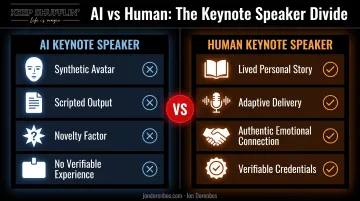
An AI keynote speaker refers to a synthetic avatar, generated voice, or AI-produced presentation standing in for a human presenter. It's a novelty that's gained attention, but it solves a different problem than what most corporate audiences actually want from a keynote.
Fortune 500 audiences respond to real personal stakes: a story they can't get anywhere else. That's the entire premise behind a speaker like Jon Dorenbos, whose keynote weaves a childhood tragedy, a 14-year NFL career, a life-threatening heart diagnosis, and live magic into one narrative. No avatar replicates that kind of lived, verifiable experience, and audiences can tell the difference.
Best Practice #1: Choose a Speaker Whose Delivery Style Translates to the Screen
Camera presence and stage presence are not the same skill. A speaker who electrifies 2,000 people in a ballroom can look strangely flat on a webcam because energy has to project differently through a lens than across a room. Volume and physicality that read as commanding in person can feel like too much, or oddly muted, in a tight video frame.
Before booking, watch a full recorded virtual talk — not a sizzle reel. Sizzle reels are edited highlights. They tell you nothing about pacing, how a speaker recovers from a tech hiccup, or whether energy holds steady for 40 straight minutes. A full recording shows you the real thing.
What to Look For in a Virtual Talk
- Visual, multi-sensory moments (live demos, props, performance) hold remote attention better than slide-heavy monologues.
- A natural rhythm of storytelling beats punctuated by something to look at, not just listen to.
- Genuine engagement with the camera, not a speaker glancing at notes off-screen.
Jon Dorenbos shows how this works on screen. His format pairs card magic, a visual hook every few minutes, with a personal story of resilience and forgiveness, so virtual audiences have something to watch, not just hear.
That mix has carried across 1,000+ live appearances for companies including Apple, Marriott, and Kroger. His team has also built a dedicated virtual keynote practice, including Marriott's virtual audience of 3,400-plus attendees and a documented talk for Lindenwood University.
Before signing, ask for a reference from a comparably sized recent virtual event. Confirm the speaker customizes the message to your organization's goals rather than delivering a generic template talk.
A speaker whose team runs a structured consultation call on your audience, challenges, and priority themes is far more likely to land than one reading from a fixed script.
Best Practice #2: Lock Down Technical Setup, Rehearsal, and Backup Plans
Content only matters if people can actually see and hear it. Bad audio is still the annoyance attendees complain about most—and it's fully preventable.
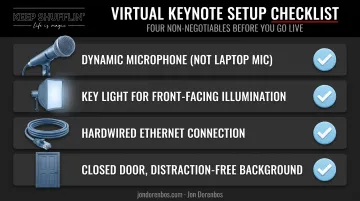
Non-negotiable technical baseline:
- A dynamic microphone — never a laptop's built-in mic
- Proper front-facing lighting, ideally natural or a dedicated key light
- A hardwired internet connection, not WiFi
- A distraction-free, closed-door background
Request a tech rider or production checklist from the speaker's team well ahead of the event. A professional operation will already have one. Jon Dorenbos's team, for example, provides a keynote rider outlining AV specifications, prop requirements, and setup timing. They typically request around 45 minutes for setup and camera rehearsal once everything on the rider is in place.
Rehearse on the Actual Platform
Don't assume a run-through on Zoom will translate cleanly to Teams or a custom livestream. Schedule a full rehearsal on the exact platform you're using to test:
- Screen-share transitions
- Audio sync between speaker and host
- Any polling, chat, or interactive tools built into the session
Build a Documented Backup Plan
Even well-prepared events lose primary AV mid-session. Lock in two contingencies before go-live:
- An alternate platform ready, with a named point-of-contact who can move the audience over without dead air
- A dedicated internal producer or moderator to manage chat, troubleshoot tech, and keep Q&A moving
That frees the speaker to focus on delivery instead of splitting attention between content and chat.
Best Practice #3: Build Interactivity Into Every Segment
Remote audiences lose focus faster than an in-person crowd. Northstar Meetings Group's practitioner guidance recommends at least one audience interaction every few minutes, or roughly every 4-5 slides. Other event experts advise never going more than about 10 minutes without engaging the audience directly.
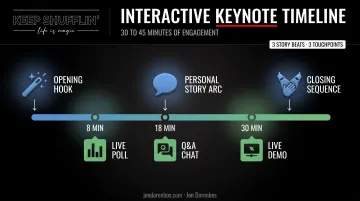
In practice, plan a direct interaction every 8–12 minutes in a virtual keynote.
Proven interactive formats to specify in your speaker brief:
- Live polls tied to specific talking points
- Chat-driven Q&A woven throughout the talk, not saved for the final five minutes
- Breakout room discussions for larger, multi-session events
- Fireside-chat-style dialogue between the speaker and a host
Structure the Talk in Beats, Not One Long Segment
A single 45-minute monologue is a hard ask for any remote audience. Structuring the presentation into shorter thematic beats, each with a clear purpose, lets energy reset regularly instead of slowly bleeding out.
This is where performance-driven speakers have a real edge. Jon Dorenbos's keynote structure moves through an opening magic hook, a personal story arc, and a closing sequence of card tricks. Each visual moment acts as a natural attention reset right after a story beat lands, giving the talk a built-in way to recapture focus.
Brief the speaker in advance on exactly which interactive elements you want. This lets them rehearse pacing, tech cues, and timing rather than improvising engagement moments live, which is where things tend to fall apart.
What Does It Cost? Budgeting for a Virtual Keynote Speaker
Virtual keynote fees generally sit below full in-person rates for the same speaker, since travel time and cost disappear. Published 2026 pricing guidance breaks virtual fees into rough tiers:
| Speaker tier | Typical fee range |
|---|---|
| Emerging expert or industry specialist | $2,500 – $7,500 |
| Professional keynote speaker or bestselling author | $10,000 – $25,000 |
| Global thought leader or celebrity | Starting at $30,000, often exceeding $100,000 |
These figures come from Speakers.com's 2026 virtual keynote pricing guide and reflect published industry guidance rather than a fixed market rate. Actual quotes still vary by speaker demand and event scope.
Hidden cost drivers to ask about upfront:
- Cross-time-zone availability premiums
- Exclusive or extended recording rights (24-hour replay is often standard; long-term intranet hosting usually costs more)
- AV redundancy or backup-technician add-ons
Get an itemized quote before signing. Confirm exactly what's included: rehearsal time, technical support, and message customization. Speakers with a structured process, such as a mandatory pre-event consultation call, make it clearer what sits in the base fee versus what bills separately.
Frequently Asked Questions
How much does a virtual keynote speaker cost?
Fees vary widely by speaker tier, ranging from around $2,500 for emerging speakers to $100,000+ for celebrity-caliber talent. Virtual rates typically run lower than in-person fees since travel is eliminated. Request an itemized quote covering rehearsal and tech support.
What is a virtual keynote speaker?
A virtual keynote speaker is the headline presenter who delivers an event's main talk remotely via video to a live, hybrid, or multi-time-zone audience. It's distinct from a webinar host or panelist since it carries the event's tone-setting role.
What is an AI keynote speaker?
An AI keynote speaker uses a synthetic avatar or AI-generated voice and content instead of a live human presenter. Most corporate audiences still respond more strongly to authentic personal storytelling than a generated performance.
What is the difference between a keynote speaker and a guest speaker?
A keynote speaker headlines the event and sets its overall tone, usually opening or closing the program. A guest speaker supports the agenda with more specific or supplementary content elsewhere in the schedule.
How long should a virtual keynote presentation be?
Roughly 30-45 minutes works best for a virtual mainstage keynote, broken into shorter interactive segments. Shorter formats around 15-30 minutes also work well depending on the event's overall agenda.
How far in advance should I book a virtual keynote speaker?
Plan for several weeks of lead time for a single virtual event, and often a few months for multi-time-zone or hybrid productions that need extra coordination. In-demand speakers book up quickly, so earlier inquiries mean more scheduling flexibility.